
Claude M365 Connector Now Free — While Microsoft Paywalls Copilot Chat (Basic) in Office Apps
Anthropic opens its M365 connector to all Claude plans — free included. Microsoft removes free Copilot Chat (Basic) from Office apps for large tenants on April 15. Here's what both changes mean for your AI tooling decision

TL;DR
- Anthropic expanded its M365 connector (Outlook, SharePoint, OneDrive, Teams) to all Claude plans including free — as of April 3
- Microsoft is removing Copilot Chat (Basic) from Word, Excel, PowerPoint, and OneNote for unlicensed users in tenants with 2,000+ seats — effective April 15. Smaller tenants keep access but get throttled
- Copilot Chat (Basic) — the free version — offered web-grounded AI chat but had no native awareness of your documents or tenant data. For many users, the in-app experience added limited value beyond what a standalone chatbot could provide
- Paid M365 Copilot still wins on live meeting intelligence, the Interpreter agent, and deep in-app integration — those are things a connector can't replicate
- The $30/month question just got harder to answer for organisations that only needed org data access
On April 3rd, Anthropic expanded its Microsoft 365 connector — Outlook, SharePoint, OneDrive, Teams — to every Claude plan, including free. No press event, no campaign. Just a post on X and an update to the support docs.
Microsoft 365 connectors are now available on every Claude plan.
— Claude (@claudeai) April 3, 2026
Connect Outlook, OneDrive, and SharePoint to bring your email, docs, and files into the conversation.
Get started here: https://t.co/EdoQeT8BBN pic.twitter.com/sOrigP41FJ
Twelve days later, on April 15, Microsoft removes Copilot Chat from Word, Excel, PowerPoint, and OneNote for unlicensed users in enterprise tenants with more than 2,000 seats. The change was communicated via Message Center notification MC1253858 — not a public announcement, not a blog post, not an update to any of Microsoft's documentation pages. Most admins will find out when features disappear.
Two product decisions. One week apart. Worth understanding together.
Copilot Chat vs M365 Copilot: They're Not the Same Product
Before going further, it's worth establishing something that Microsoft's own branding makes genuinely confusing: Copilot Chat and M365 Copilot are not the same product.
Copilot Chat is the free tier — web-grounded AI chat included with qualifying M365 business subscriptions. It has no access to your tenant data. No emails, no SharePoint files, no Teams conversations, no calendar. It cannot summarise meetings, provide live in-call recaps, or search your organization's documents.
Microsoft calls it "embedded" — Copilot Chat right inside Word, Excel, PowerPoint, and OneNote. For enterprise tenants with more than 2,000 seats, that goes away on April 15. For smaller organizations it stays, just throttled. Either way, it was a web chatbot in a sidebar. Want it to help with your spreadsheet? Copy the data in, get a response, copy it back out. You're in Excel. Copilot is in Excel. Copilot cannot see Excel. The sidebar knew you were there — it just couldn't be bothered to look. Embedded in name. Blind in practice.
M365 Copilot is the $30/user/month paid add-on. That's the product with full tenant grounding via Microsoft Graph, live Teams meeting intelligence, in-app embedding in Word and Excel, and real-time in-call summarisation. It is a genuinely different product.
This distinction matters for everything that follows. The changes happening on April 15 affect Copilot Chat — the free tier. M365 Copilot is unchanged.
Scope note: this article focuses on knowledge workers and general productivity use, specifically Claude (claude.ai) and Microsoft's Copilot Chat / M365 Copilot. It does not cover developer tooling — Claude Code (Anthropic) and GitHub Copilot (Microsoft/GitHub) are distinct products aimed at developers, and that comparison deserves its own post.
What Microsoft Is Removing From Copilot Chat on April 15th 2026
According to Microsoft Message Center notification MC1253858, the changes break down by tenant size:
Organizations with more than 2,000 M365 seats: Copilot Chat is removed entirely from Word, Excel, PowerPoint, and OneNote for unlicensed users. No in-app AI at all. Unlicensed users are redirected to the standalone Microsoft 365 Copilot app.
Organizations with fewer than 2,000 seats: Access isn't removed, but it's degraded. Unlicensed users are downgraded to a "standard access" tier — throttled performance at peak times, potential routing to older models, and in-product nudges to upgrade. Microsoft is rebranding the tiers as "Copilot Chat (Basic)" for unlicensed users and "M365 Copilot (Premium)" for paid license holders.
Outlook exception: Copilot Chat in Outlook remains unaffected for everyone — inbox and calendar grounding continues to work regardless of tenant size or license.
Worth stating plainly: Microsoft has not updated any of its public-facing documentation to reflect these changes. Most organizations will find out via a Message Center notification, a third-party blog, or when features simply disappear on April 15.
Why did Microsoft remove it? Microsoft’s own numbers tell part of the story: the company disclosed roughly 15 million Copilot seats across about 450 million Microsoft 365 commercial users — still low single-digit adoption. Running free AI infrastructure for the vast majority of users on a product that wasn’t delivering real in-app value wasn’t sustainable. There’s also the upsell dynamic — removing something people got used to creates pressure to upgrade. Reserving the “Copilot in Word” label for the version that actually works in the document might be the most honest thing Microsoft has done with this product in a while.
Claude's Free M365 Connector: What It Gives You
Until April 3rd, the M365 connector was gated behind paid Claude plans — Team and Enterprise only. As of this week, it's available to everyone, including users on the free tier. That's a meaningful shift in what free Claude can actually do at work.
With the connector enabled, Claude can access:
- Outlook — search email threads, extract action items, draft context-aware replies
- SharePoint & OneDrive — search across sites and document libraries without manual uploads
- Teams — surface decisions from channel discussions and meeting summaries
- Calendar — pull meeting context, prep agendas, understand your schedule in conversation
This is the organizational data grounding that makes workplace AI actually useful — the ability to ask "what did the team decide about Project X last month?" and get an answer rooted in your real work. Until this week, getting that from Claude cost money. Now it doesn't.
There's an irony in the timing. Anthropic's free connector may make Microsoft's conversion problem harder to solve, not easier. The users being nudged toward $30/month now have a credible free alternative for org data access. But the users most likely to pay for paid M365 Copilot probably aren't paying for org data grounding alone — they're paying for live meeting intelligence, the Interpreter agent, and deep in-app integration. Those are things a connector can't replicate. Whether that's a large enough segment to justify the price is the question each organization now has to answer for itself.
How Claude's M365 Connector Works: Delegated Access Explained
Claude doesn't get its own set of keys to your M365 environment. When a user connects the connector, Claude authenticates as that user via OAuth delegated access. Every Graph API call is scoped to that user's existing permissions — the same SharePoint sites, mailboxes, and Teams channels they can already access. Nothing more.

Sensitivity labels, Conditional Access policies, and permission boundaries all apply normally. There's no elevation of privilege.
The implication is worth stating plainly: your existing M365 governance is your Claude governance. Clean permissions mean clean Claude access. Overly broad access means overly broad Claude access — that's not a Claude problem, it's a pre-existing permissions hygiene problem that AI now makes more visible.
If you’re in IT/security, this is the part that matters
Before you click through the admin consent flow, it's worth knowing exactly what the M365 MCP Server for Claude Enterprise Application requests. There are 27 Microsoft Graph permissions — all delegated, all requiring admin consent.
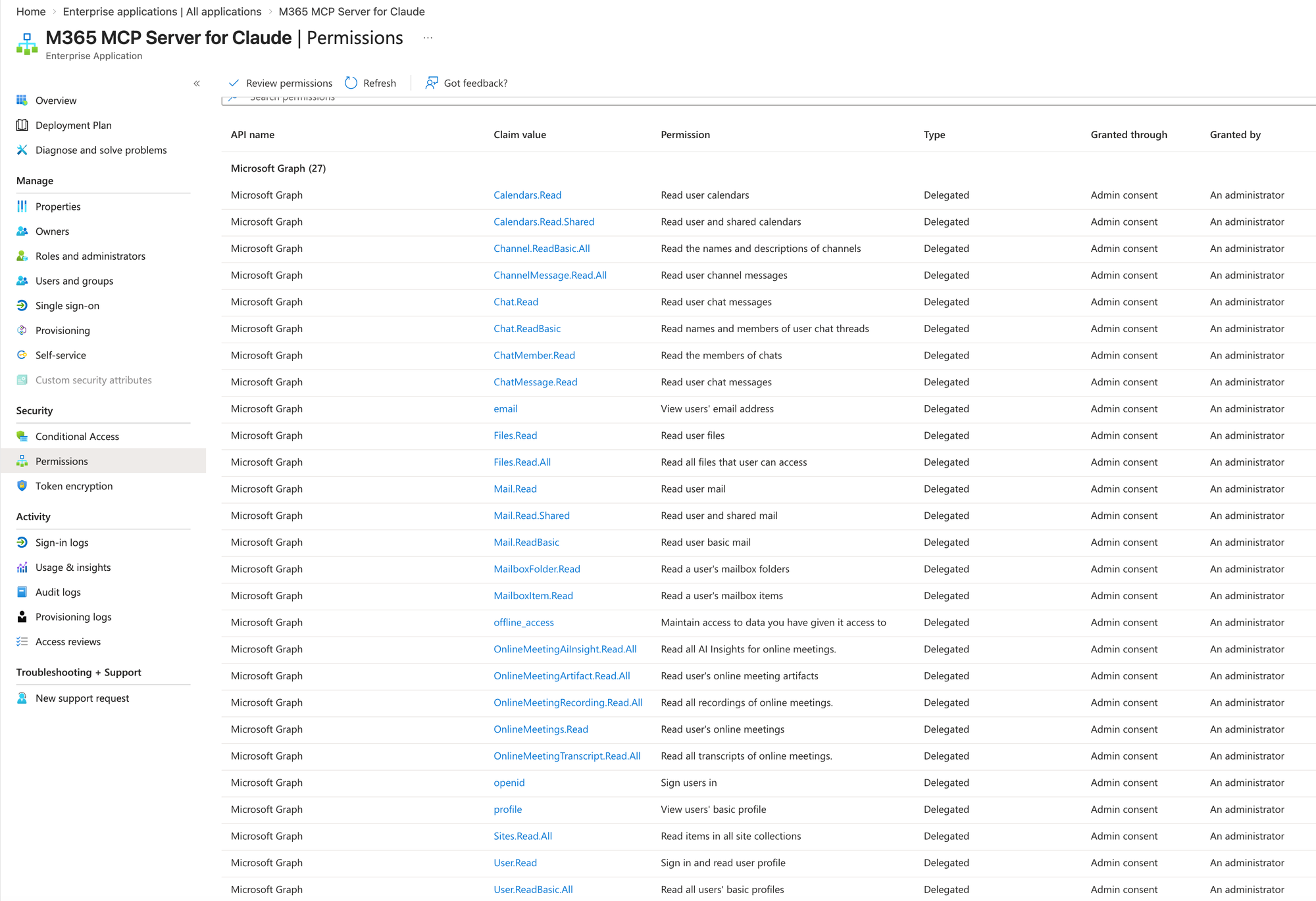
Most are expected: mail, files, calendar, Teams channels and chats, SharePoint sites. But a few will likely catch your security team's attention:
OnlineMeetingRecording.Read.All— read all recordings of online meetingsOnlineMeetingTranscript.Read.All— read all transcripts of online meetingsOnlineMeetingArtifact.Read.All— read meeting artifactsOnlineMeetingAIInsight.Read.All— read AI insights for online meetings
None of these permissions are hidden — they're visible in your Entra Admin Center under Enterprise Applications → M365 MCP Server for Claude → Permissions. Review them there, decide which ones align with your organization's risk posture, and revoke any you're not comfortable with before enabling access for users.
Two actions before you go wide: revoke any permissions you're not comfortable with directly in Entra Admin Center, and set "Assignment required" to Yes on both service principals so users can't self-enable without being explicitly added. Everything else follows from those two controls.
Where Paid M365 Copilot Still Wins Over Claude
To be clear: none of this changes the case for paid M365 Copilot for the right users. This isn't a story about M365 Copilot losing ground — it's a story about the free tier calculus changing.
There are things paid M365 Copilot does that Claude's connector simply cannot replicate — and they all share a common thread: they're live, embedded, and deeply integrated into the Teams and Office infrastructure.
Live Teams meeting intelligence is the most well-known. While you're still on the call, Copilot is already summarizing what's been said, surfacing action items, and letting latecomers catch up in real time. Claude's connector can read Teams meeting summaries — but only after they've been saved. It's retrospective.
The Interpreter agent is less talked about but arguably just as compelling for global organizations. It provides real-time speech-to-speech translation during Teams meetings — and with voice simulation enabled, other participants hear the translation in your simulated voice, not a generic AI voice. That's a deeply embedded Teams capability that requires an M365 Copilot license and has no external connector equivalent.
Native in-app embedding — Copilot works directly inside Word, Excel, PowerPoint, and Outlook without leaving the app. Claude's add-ins for Excel and PowerPoint help, but the depth of integration isn't the same.
Copilot Memory learns your habits, preferences, and working style over time, adapting responses to how you specifically work. Basic memory is available to all Copilot Chat users from chat history. Paid M365 Copilot enhances this further with org data grounding — responses informed by your emails, meetings, and documents, not just your chat history. A connector that reads data on demand can't replicate that kind of accumulated, org-aware context.
One more thing worth knowing at the paid tier: if you have an M365 Copilot license, you can already select Claude Sonnet as your model directly inside Copilot Chat via the model selector — alongside Researcher agent and Agent Mode in Excel. Paid M365 Copilot and Claude are increasingly the same thing, not competing choices. The model selector is not available on the free Copilot Chat tier.
Claude vs Copilot Chat: The Free Tier Comparison Has Changed
Going into this week, both Microsoft's free Copilot Chat and Claude's free tier were roughly equivalent: capable web chatbots with no access to your organization's data.
As of April 3, that's no longer true. Claude free now reaches into your Outlook, SharePoint, OneDrive, and Teams. Microsoft free is about to lose even the basic in-app features it had — and for enterprise tenants with more than 2,000 seats, that happens in twelve days.
Microsoft's April 15 move was designed to push unlicensed users toward a $30 Copilot add-on or the new $99 E7 suite. Then Anthropic opened the M365 connector to free accounts twelve days earlier. Whether that timing was deliberate or not, the result is the same: organizations that were being nudged toward an upgrade decision now have a free alternative worth evaluating first.
The honest framing: paid M365 Copilot is the right tool where live meeting intelligence and native in-app embedding justify the $30/user/month. For everything else — research, drafting, document analysis, email triage — Claude with the free M365 connector is now a credible, and significantly cheaper, alternative.
Carl writes about Microsoft 365, Teams, and AI at easy365.io — independently, with no commercial relationship with Anthropic or Microsoft.
Sources: Claude on X, April 3, 2026 · Anthropic Support — Enable and use the M365 connector · Microsoft MC1253858 via changepilot.cloud · The Tech Outlook, April 4, 2026