Export Teams Meeting Recaps with the Copilot Meeting Insights API
Learn how to export Microsoft Teams Intelligent Recap as structured JSON using the Microsoft Graph Meeting AI Insights API.

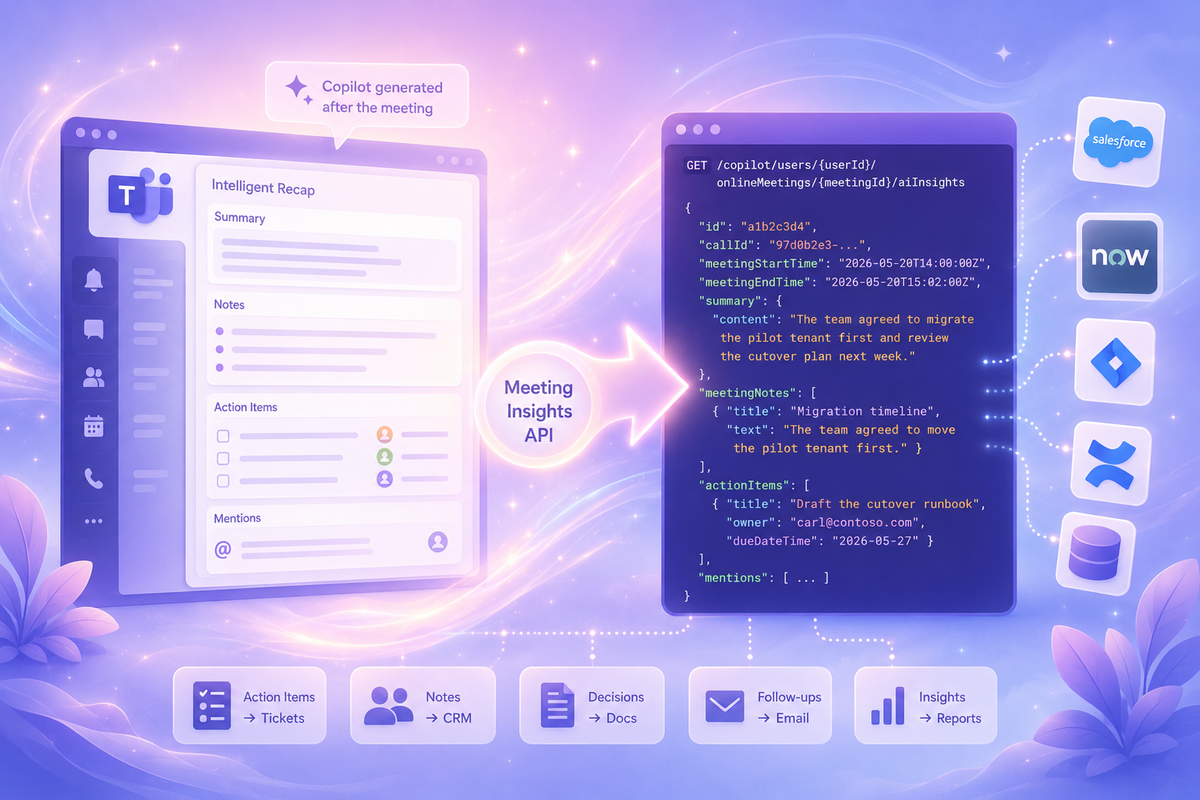
For users with a Microsoft 365 Copilot license, every transcribed Teams meeting already has a recap. Copilot generates the Intelligent Recap automatically: summary, notes, action items, decisions, and participant mentions.
Your Teams meeting recaps don't have to die in the chat. Your meeting ended. The data shouldn't.
The Microsoft Graph Meeting AI Insights API lets you export all of it as structured JSON.

/copilot/…/aiInsights
Action items become ServiceNow tickets or Jira issues. Follow-ups land on Salesforce opportunities or HubSpot deals. Decisions get written into IT Glue, Hudu, or Confluence. The recap stops being something people read once in Teams and becomes another source of structured business data.
Skip the Middleware and the Third-Party Bots
A few years ago, routing meeting data into your CRM or ITSM meant a new vendor, a new contract, and a new line item on the budget. An integration platform to connect the dots, a per-task pricing model to keep you honest, and a consultant to set it up. And if you wanted AI meeting summaries, add another bot joining your calls and announcing itself at the start.
That math has changed.
If your organization already has Microsoft 365 Copilot, you're paying for a bot that joins calls, transcribes, and summarizes. And with two API calls, it can send every insight to whatever system you need.
When it comes to building the integration that routes it into Salesforce, ServiceNow, or whatever system your business already runs on, it doesn't have to be a heavy lift. Copilot can write that script too. This is exactly the platform shift we wrote about earlier — what used to require separate AI, integration, and development tools is now part of the same platform.
Your Copilot license is the platform. The only thing left to build is the part that's specific to your business, and that's exactly what AI-assisted development is good at.
What the API Actually Returns
Before writing any code, it helps to see the payload:
 {
  "id": "VjEjI...",
  "callId": "f3fe3729-...",
  "createdDateTime": "2026-05-03T18:38:42Z",
  "meetingNotes": [
    {
      "title": "Platform Architecture Discussion",
      "text": "The team discussed scalability and the need for a unified data and reasoning layer across business units.",
      "subpoints": [
        {
          "title": "Unified Data Layer",
          "text": "The group agreed on the strategic value of integrating reasoning across the platform."
        }
      ]
    }
  ],
  "actionItems": [
    {
      "title": "Update configurability section",
      "text": "Expand the section on product configurability and tuning by non-experts.",
      "ownerDisplayName": "Carl"
    },
    {
      "title": "Add closing statement",
      "text": "Include experience turning POC code into production for big banks.",
      "ownerDisplayName": "Carl"
    }
  ]
}
meetingNotes comes back as a structured hierarchy with titles, body text, and subpoints. actionItems carries a title, a description, and an owner. Both map cleanly onto the destination systems above.
Get the Copilot Recap from a Meeting ID
Unlike the rest of the meeting API, these insights live under the /copilot namespace in Microsoft Graph because they require a Copilot license, not just a standard Microsoft 365 license.
Getting the meeting ID is the tricky part. That's what the previous post is for.
The rest is two API calls.
In testing, recurring meetings produced multiple insight objects, one per meeting occurrence. Check createdDateTime to select the correct recap.
Before running the script, three things need to be in place:
- Microsoft 365 Copilot license — the user whose meeting you are querying needs one. The license check is enforced against the
userIdin the API path. - Transcription enabled — Copilot generates the recap from the transcript. No transcription, no recap, nothing to export.
- A meeting ID — the previous post covers how to resolve one from a subject or date.
Connect-MgGraph -Scopes "OnlineMeetingAiInsight.Read.All"

$userGuid  = "User GUID"
$meetingId = "Meeting ID"

# 1. List available AI insights for this meeting
$insightsUri = "https://graph.microsoft.com/v1.0/copilot/users/$userGuid/onlineMeetings/$meetingId/aiInsights"
$insights    = (Invoke-MgGraphRequest -Method GET -Uri $insightsUri).value

if (-not $insights) {
    Write-Host "No AI insights found. Was the meeting transcribed, and is it still within retention?" -ForegroundColor Yellow
    return
}

# 2. Fetch the full recap (takes the first insight — for recurring meetings, filter by createdDateTime to get the right occurrence)
$insightId = $insights[0].id
$insight   = Invoke-MgGraphRequest -Method GET -Uri "$insightsUri/$insightId"

Write-Host ($insight | ConvertTo-Json -Depth 10)
From there the destination is yours: ServiceNow tickets, a Salesforce opportunity, an IT Glue page for whoever inherits the account next.
Meeting AI Insights API: Permissions, Limits, and Gotchas
Application Permissions
A quick distinction before the setup. Microsoft Graph supports two authentication models: delegated permissions run in the context of a signed-in user, so the app can only do what that user can do; application permissions run as the app itself with no user present, which is what you need for unattended background services. For most of the meeting API, delegated permissions are sufficient. For automated exports that run without someone sitting at a keyboard, you want application permissions.
Application permissions are supported, but you need both the OnlineMeetingAiInsight.Read.All Graph permission and a Teams application access policy. Missing either one produces a different error message, which at least makes it easy to tell which one you're missing. Support was added in November 2025 alongside the v1.0 GA release. If you're building unattended exports, make sure both are configured before troubleshooting anything else.
The setup is two commands in Teams PowerShell:
New-CsApplicationAccessPolicy -Identity "Access-All-Meeting-Insights" -AppIds "your-app-client-id"

# Assign to a specific user
Grant-CsApplicationAccessPolicy -PolicyName "Access-All-Meeting-Insights" -Identity "user-object-id"

# Or assign to the whole tenant
Grant-CsApplicationAccessPolicy -PolicyName "Access-All-Meeting-Insights" -Global
Tom Morgan flagged the original delegated-only limitation when the API shipped; both requirements are confirmed from real testing against the v1.0 endpoint.
Insights Take Up to Four Hours to Appear
They are generated asynchronously after the meeting ends, and Microsoft notes availability can lag by as much as four hours. An export that fires the moment a meeting ends will find nothing and decide the API is broken. Build in the delay, or poll.
Channel Meetings Are Not Supported
The API covers private scheduled meetings, town halls, webinars, and Meet Now sessions, but not channel meetings. If a team runs its standups in a channel, those recaps stay in Teams and out of reach.
The Copilot License Is Non-Negotiable
The user whose meeting you are querying needs a Microsoft 365 Copilot license — the license check is enforced against the userId in the request path, which is the one thing Microsoft never forgets to check. If the recap shows up in that user's Teams UI, the license is already in place and the API will return it.
Start Exporting Your Microsoft Teams Meeting Recaps
Microsoft quietly gave you the AI, the data, and the API. Most teams just haven't connected the dots yet.
Every transcribed meeting in your organization is already generating structured intelligence: notes, decisions, action items, owners, and follow-ups. The Meeting AI Insights API is the bridge between that data and the systems where work actually happens.
And unlike most enterprise integrations, you don't need a new platform to build it. Copilot generates the data. Microsoft Graph exposes it. Copilot can even help build the integration.
Your Copilot license is already generating this data after every transcribed meeting. The Meeting AI Insights API simply gives you a way to put it to work before it disappears into another meeting chat.